

Rovo Dev in Frontend Platform Engineering – AI for small tasks, AI for big tasks
TL;DR
Rovo Dev really shines with big scale automating platform engineering tasks – like migrating between libraries, where similar patterns need to be applied across whole repo and where codemods might not be able to cover all the cases.
Rovo Dev doesn’t limit to just execution – it can help with all the stages of delivery:
- planning / spikes – building PoC / playgrounds / classifying changes
- writing harness / orchestration for executing migration tasks
- building validation steps which will be used as a feedback loop for the coder agent
The experiment to migrate styled-components to @compiled css-in-js resulted in migrating majority of usages (most of them tricky edge cases, where codemods couldn’t update them) in short amount of time (total time to generate PRs within 3 days and minimal supervision – optimistically estimated as 14 engdays using artisan way of development).
Additionally, to lower PR review pain (and decrease time to merge), Rovo Dev helped to build validation tools – used by both Rovo Dev to correct its mistakes and give the snapshot of styles to the reviewing team with highlighted differences (if applicable).
Rovo Dev can help a lot with many common platform tasks – one of them which I have stumbled upon most recently is migration from library A → library B (outdated styled-components to Compiled css-in-js).
For migration-type of tasks the execution can take significant amount of time, despite the work being quite repetitive (however nuanced from case to case) – that’s where I hoped Rovo Dev help to close the gap of codemods.

Preparation for the big task – migrating Styled Components to Compiled
The main experiment was how to run bigger spec-driven project of mass migration of almost 200 files including styled-components library to their Compiled replacement.
To make Rovo Dev to execute on an one shot bigger task we need to organise spec document describing whole project. Particular agents will consume / get as a context relevant parts of the document and execute on them.
The spec document needs to include execution plan for the project – that’s why Plan part takes much more time as it needs to include:
- description of changes needed (how to migrate)
- detailed plan of action (which files, which patterns to apply)
- description of the workflow (agents/roles/scope)
- validation guideline / acceptance criteria
Rovo Dev as a classifier
To get better understanding of the changes / instructions needed for coding agents, Rovo Dev can do pretty good job in analysing existing occurrences of deprecated library and provide summary.
In case of styled-components I found there will be three different types of usages:
- simple – should be codemod-able
- dynamic – values may depend on props, but applied value is static (e.g.
props.isVisible ? 'block': 'hidden') - complex – all kind of complex stuff which
styled-componentsused to allow – this category may need more attention from engineer
The results are usually good enough to provide overall understanding of the scale of the task and help to split migration into milestones / reasonable size PRs.
As the output of this phase I got:
- list of packages / files grouped by team
- description of changes needed for each coding agent

Migration instructions for Rovo Dev agents
Traversing through multiple different guides how to migrate to @compiled can be convoluted, especially when comparing available APIs versus stronger internal quality requirements – to keep changes reasonable to review (simple paradigm – matching styles between components) and avoid applying deprecated APIs (styled), the choice was to apply recommended cssMap from @compiled.
Few first components have been migrated based on fairly short instructions – while assessing few different use cases, after each guided session (aka always pass props to the component) I asked Rovo Dev about self-reflection and include it to the migration guide.
What did you learn from this session? Update migration playbook.Results have been great – from small adjustments about order of component to complex things like handling nested pseudoselectors – all neatly added to the .md file with migration instructions. And it worked well almost all the time – remember to keep session clean for each use case to avoid confusion by agent.

Rovo Dev as a playground / temporary tools developer
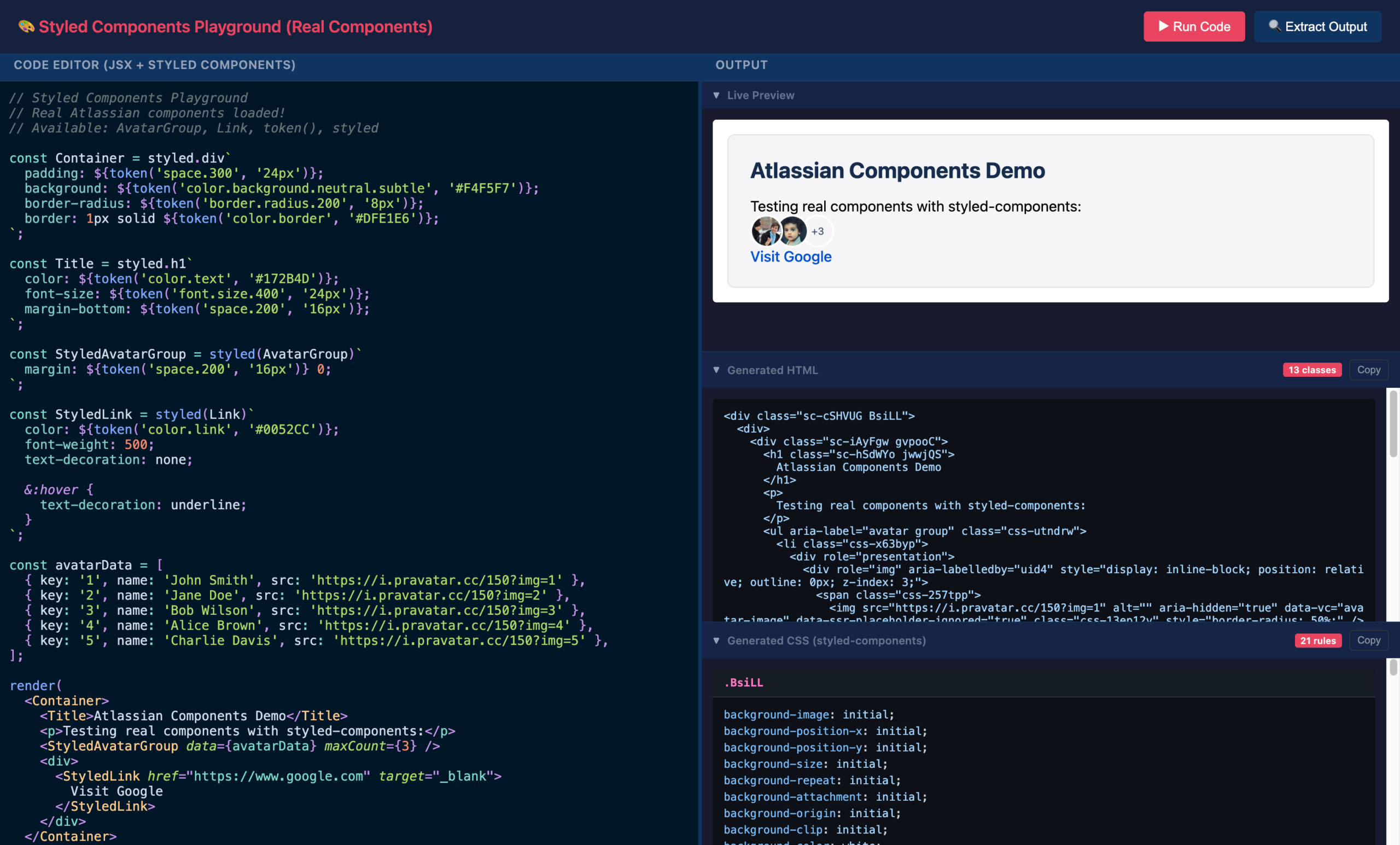
To validate the reliability of the outputs in certain scenarios – I needed a playground for it. As Compiled is the ‘build-level’ mangling code library – making it available in the browser would be fairly challenging.
LLMs seem to be trained on all cases of playgrounds – the output from sessions gave higher quality that expected. While the solution might not be production ready (and every try to generate it again gave slightly different UI), it did its job to help to look into Compiled details and confirm behaviour in certain use cases (especially with the behaviour of legacy solutions).

Validation
Careful automated validation step which results in just-working code feels.
In case of working with changes which touch visual parts and yet, they should change them there is few options which will help with validation.
VR tests
Obvious, but expensive one. Components with available tests have been updated to always render migrated components – snapshot taken on the styled-components version would fail if the styles are different in compiled version. If tests are not available – the snapshots can be generated with Feature Gate (FG) off and tested against FG on.
While it is pretty good to show the difference, the automated patch based on the results needs extended setup (browser + storybook) and in case of publishing hundreds of new VR tests – will impact pipeline timings and cost.
In case of Styled Components migration – they did pick up only 3 differences – with missing margins on complex (multiple level extended) components.
 Style snapshot testing
To speed up validation process – to be more precise and not expensive – I used Rovo Dev to help me prepare utils (extractStyleSnapshot) for unit tests which will help to extract generated styles (from <style> tags), match them to generated HTML and compare both versions.
The inline snapshots are much easier to read by reviewer and any differences between solutions are available in the same file (usually the differences are about formatting or postcss transforms which adjust original CSS definitions).
The separate guide how to write these tests (and how to test different combinations) plugged into the process and handled by test writing agent simplifies whole process and the output has all the pieces – migrated components, tests and potential issues highlighted.
Tests have been useful beyond validation if Styled Components match Compiled styles – they also found few issues with existing definitions of Styled Components, also finding the root cause (like typos in props names).
The differences in CSS reported in the snapshot tests are much easier to understand and fixed by LLMs – usually added explanations are good enough (confirmed by validating in the playground).
Example of generated tests with the description of tested combinations at the top for the reviewers, snapshot of original styles and testing exact match with FG on:
/**
 * Style comparison test coverage (styled-components vs Compiled)
 *
 * | Component | Dynamic props | Tested combinations |
 * |-----------|---------------|---------------------|
 * | MyComponent | — | (none) |
 */

describe('MyComponent styled components', () => {
	describe('style comparison (styled-components vs Compiled)', () => {
		describe('MyComponent', () => {
			let baselineStyles: string;
			const migratedComponent = (
				<MyComponent>
					Content
				</MyComponent>
			);

			it('snapshot of normalized styles with FG off (styled-components baseline)', () => {
				setFeatureGateValue('migration_feature_gate', false);
				baselineStyles = extractStyleSnapshot(migratedComponent);
				expect(baselineStyles).toMatchInlineSnapshot(`
			{
			  "&": [
			    "padding-bottom: var(--ds-space-300,24px)"
			  ],
			  "& td": [
			    "vertical-align: top"
			  ]
			}
		`);
			});

			it('FG on (Compiled) styles match baseline from FG off', () => {
				setFeatureGateValue('migration_feature_gate', true);
				const compiledStyles = extractStyleSnapshot(migratedComponent);
				expect(compiledStyles).toBe(baselineStyles);
			});
		});
Big task – execution
With all steps prepared – and spec document ready, it is time to get Rovo Dev to run to pick up tasks and execute autonomously.
If whole spec is already saved as content of the work item and subtasks with the actions for subagents are generated, the command to start migration can be as simple as:
You are the orchestrator agent for the task from ticket: [Ticket].
For each subtask in the ticket - start subagent with the context taken from the ticket.
Start subagent type which is described in the ticket.
The definition of the harness may differ from task to task, hence I found it better to keep in the task – as it is also easier for future reuse.
Planner / tracking progress – Jira as a tool of choice for tracking
To monitor progress of the execution, there can be used any option of storage – starting from files and local databases – to project management tools like Jira.
IMHO Jira offers everything what is needed to manage autonomous execution of projects – multiple level of tasks, states (which can be used e.g. to ask for human input), comments which help to track progress of work (and potentially restart it if necessary).
In case of updates published by agent to the ticket it might be desired to specify what should be updated and in which format to avoid bloated communication.

Subagents / clean context – better results with leaner context
Rovo Dev has native way to spin up to 4 subagents – where it can inject specified context.
That separation of context gives two main benefits:
- context of the orchestrator isn’t spammed with the results of the coding / testing – which let’s to run it for extended amount of time without breaching context window
- subagents have clean context and be more accurate with the results (e.g. with component names) when context is crafted for their purpose
- it is cheaper as context window fills up much slower
Subagents still have access to all the tools – they get assigned task from Jira and publish updates directly there. In case of failure of some agents, they can be picked up again – and can either start from scratch or follow log from the Jira ticket and continue work.
Results
The styled-components migration has been done in two rounds – first assisted with Rovo Dev to generate comprehensive migration guide (2 days to migrate 40% of components) then one shot migration of rest of the components (over 1 day autonomous work).
Numbers:
- migrated components: 262
- number of files changes: 189
