
Install once, use everywhere: Multi-app compatibility is now live on the Marketplace
Have you ever gone to the Atlassian Marketplace looking for an app that works with both Jira and Confluence? Maybe you found the perfect solution for Jira, only to then hunt down a separate Confluence listing and repeat the entire installation process from scratch. It’s natural to expect Marketplace apps to offer the same cross-platform flexibility your teams already have in their day-to-day work.
Today, we’re announcing that Marketplace apps that work across multiple Atlassian apps are now generally available. That means a single app can now be used in both Jira and Confluence, so you can bridge work across tools with less admin overhead.
Multiple-app compatibility means less friction at every step. Instead of discovering, installing, and managing separate versions of the same app for Jira and Confluence, you can install it once and use it across your Atlassian apps. That translates into faster setup, fewer admin cycles spent juggling licenses and updates, and a more consistent experience for your end users.
Find and buy multiple-app solutions on the Marketplace
To check whether a Marketplace app can work with multiple Atlassian apps, just navigate to the listing. Now, you’ll see two new attributes on the listing that tell you the app’s installation dependencies: Requires and Works With.

Requires indicates the primary Atlassian app that the Marketplace app installs into. At a minimum, you must have this required Atlassian app to install the app.
The example below showcases how admins would install an app across multiple Atlassian apps from the Admin hub.
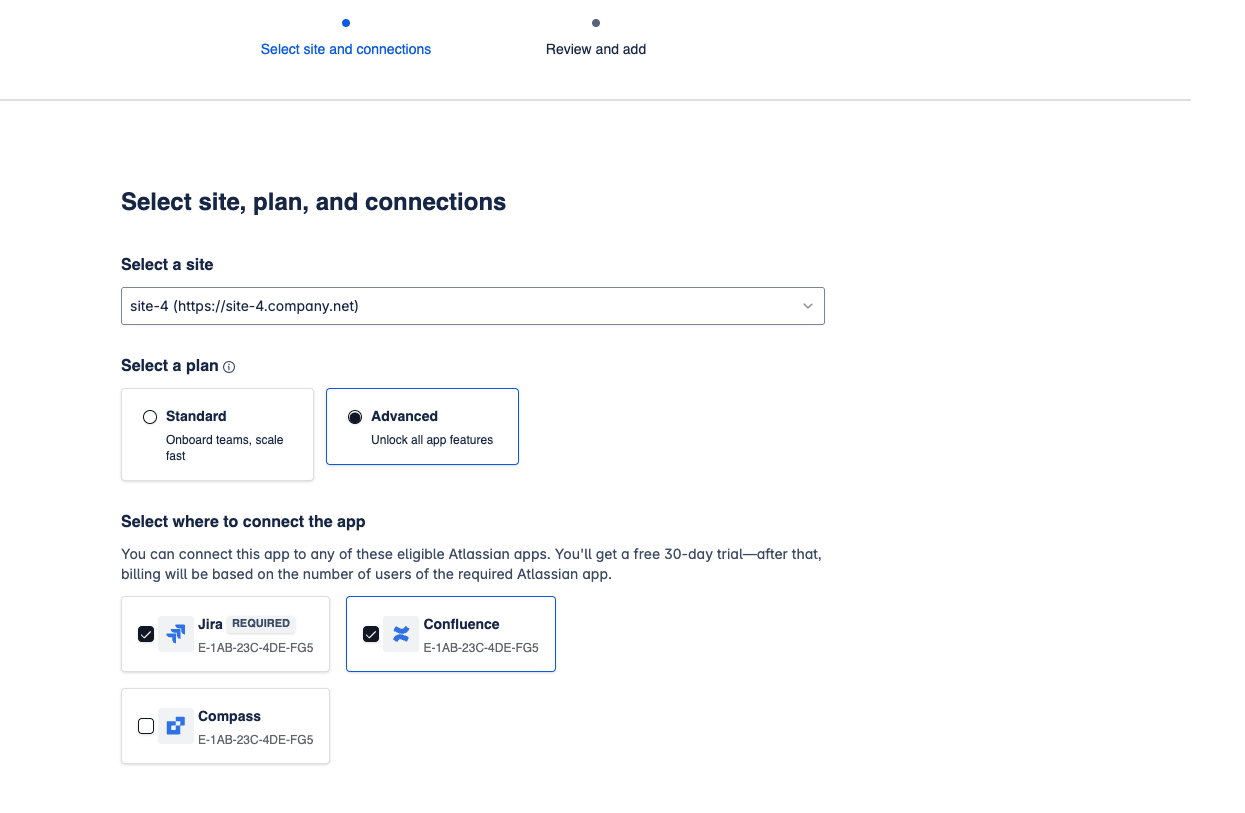
Once installed, admins can configure a connection to the Works With Atlassian app to unlock cross-app functionality by clicking “Connect” from the Connected apps tab in Atlassian Administration.

However, these apps are not connected by default. Admins can choose when to connect the app to additional Atlassian apps once they’re ready.
When it comes to purchasing, seat pricing is tied to the required installation context. For example, if an app requires Jira, the Jira seat count for that app determines how it’s billed, and connecting it to other Atlassian apps comes at no additional cost.
Explore what’s available today
With that in mind, ready to check out a few great examples? Here’s a collection of multi‑compatible apps that are live and ready for you to try:

Frank – Not Your Regular HR Solution
Born out of our recent Codegeist hackathon, Frank took first place for a reason. It centralizes profiles, teams, and documents in Jira and Confluence, with HR-safe permissions automatically applied so sensitive information stays protected. Frank also turns your Confluence documents into standardized, repeatable tasks, ensuring managers and HR stay aligned and on track every time.

T. is app adds a gadget to your Jira instance that lets you display external web pages or images directly on a dashboard. It also allows you to embed a Confluence page into a Jira dashboard, bringing key context and content into one place.

Sum Up Reports for Jira & Confluence
Sum Up Reports lets you select the issue fields you care about and automatically calculate totals or averages. You can group data by any field (such as sprint, status, assignee, component, or project) and aggregate values, such as story points or time estimates. Reports can then be surfaced in Confluence, giving teams a clear, shareable view of their work.

Task Reports for Jira (Confluence Gadgets, Calendar Gadget)
This app saves teams critical time by consolidating all Confluence tasks into flexible, customizable dashboards across Jira and Confluence, eliminating context switching while giving teams unified visibility and control over unfinished action items.
With 20+ apps already live and more being added every day, don’t miss the chance to trial them free for 30 days and discover your new favorite.