Rovo Chat began as a tool for searching internal Atlassian data. We quickly expanded its capabilities to retrieve information from external systems, now supporting over 50 third-party data sources.
As language models evolve, it is clear that Rovo Chat must power end-to-end user workflows. Every user should have access to an always-on sidekick capable of tackling large tasks, planning work, and managing complex, cross-cutting workflows.
While typical coding agents run locally on a user’s machine (using the local OS as a sandbox), code agents and chat applications are beginning to converge. This alignment means that design choices optimized for coding agents are now perfectly suited for generalized personal assistants.
To power this shift, we had to fundamentally rethink our execution model. Our new agent harness moves beyond simple, synchronous tool calls into a robust, distributed environment. By combining a split-plane architecture with isolated compute sandboxes, asynchronous multi-agent coordination, and automated self-evolution, we are laying the foundation for a truly autonomous, always-on digital twin.
Split Plane Architecture
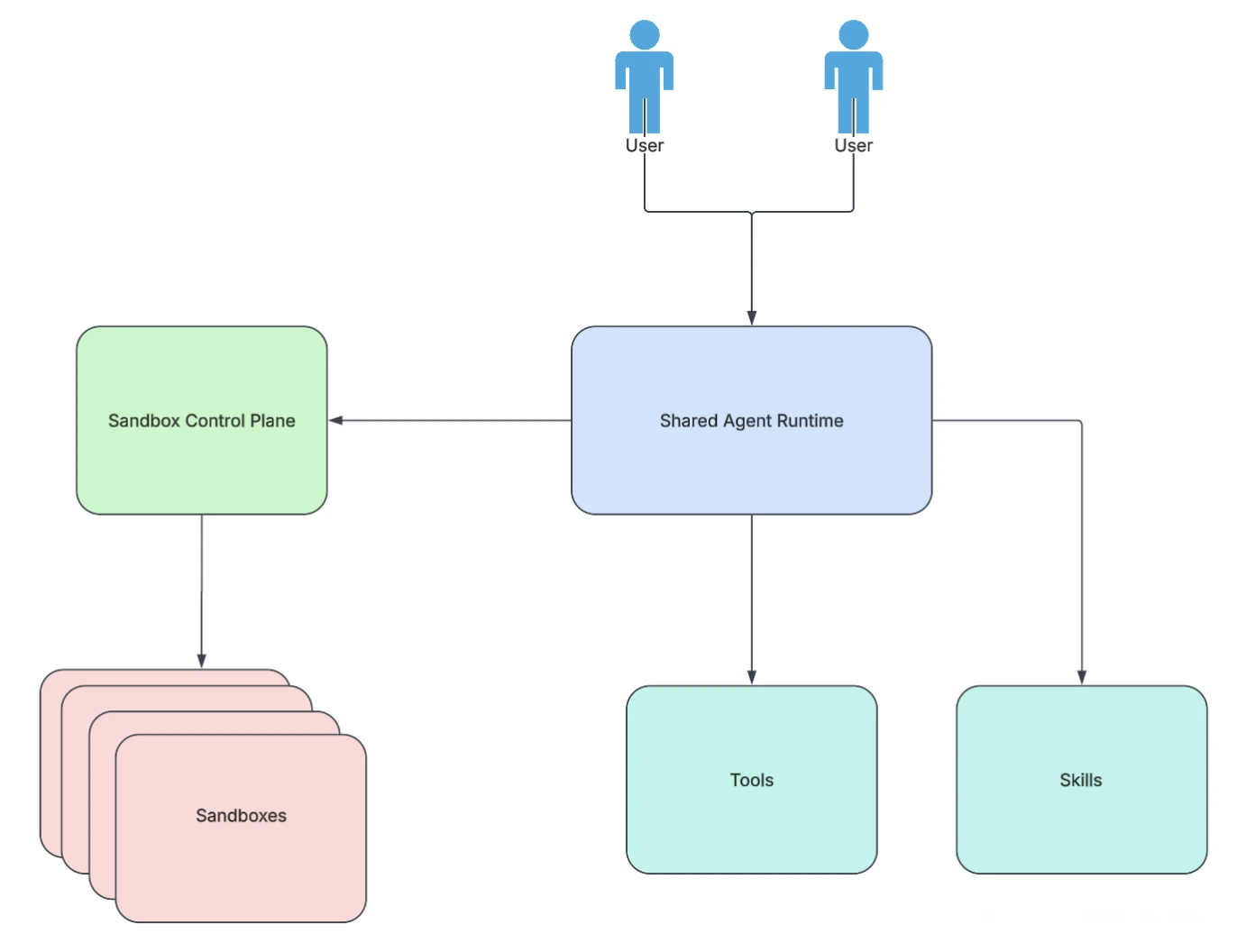
Early on we made the decision to separate the data plane and control plane. This allows us to scale each one independently, improve resilience and ensure reliability on each. We can degrade gracefully and ensure reliability of each system in isolation. We had thought about placing the agent harness directly in the sandbox as a monolithic design but in a distributed environment, this becomes more complicated. How do we handle resilience, redundancy, and failure modes? How do we ensure that if the sandbox crashes, we will have the conversation stored and that we can quickly recover?
Some of the other considerations in deciding to go with a split plane architecture:
Graceful Degradation
When the sandbox fails, the conversation should live on. To the user, chat is the most basic interface that they are interacting with. The sandbox is an underlying construct that needs to be abstracted away from the user. This means sandbox failures must be recoverable with no user perceived impact.
If the sandbox runs the agent and sandbox goes down, the user will see the entire agent crash. Separating them out ensures that the user connects directly to the control plane, and if the sandbox crashes the agent will just retry and spin up a new sandbox container transparently.
Efficient scaling
The underlying sandbox should scale independently from the agent that is running. If the tasks that are executing in the sandbox are too heavy, then the control plane should be able to start up a larger sandbox instance.
In addition to this, we can scale out the sandbox as needed. For simple operations we opt to use a smaller sandbox instance size which is upgraded if the required compute increases.
Agent Density
As part of our design, we want our agent to function as an always-available assistant, processing relevant notifications and tackling large tasks in the background. Keeping the control plane separate means one scaled service will handle events for millions of users. Each user’s agent can respond at any moment without relying on creating a new sandbox instance, yet providing all the benefits of the sandbox at a moment’s notice, increasing the density of agents.
Multi Platform Support
This one split plane architecture means that local instances of a chat instance can share the same underlying architecture without having to rely on a heavy local binary to run the agent. Any improvements that are made to the agent are all baked directly into the agent and never require the user to manually upgrade.
Beyond MCP: Programmatic Tool Calling in the Sandbox
Without a sandbox, we are constricted by the models capabilities. Using sandbox, we unlock a new world of analysis, determinism, and computer use that would otherwise be impossible. Product managers, engineering leads, and business analysts frequently ask questions requiring deep analysis. Answering them requires parsing massive volumes of Jira work items, Atlas goals, and external data sources. Relying on an LLM to sequentially invoke tools and handle pagination for large datasets is incredibly inefficient. Instead, we need to offload data iteration and pagination to code execution – an approach that has gained significant traction across industry including implementations by by Anthropic (“computer use / code mode”) and Cloudflare (“programmatic tool calling”).
Beyond the efficiency gains on tool use, a sandbox introduces a great place to store temporary information, generate visualization, and create artifacts for the user to interact with.
Considering the vast number of capabilities and actions in products like Jira and Confluence, there are thousands of actions that can be taken. By combining programmatic tool calling with progressive disclosure, we can safely expose thousands of API actions to the agent, achieving maximum coverage across both first-party and third-party products.
Dynamic Model Selection for Efficient Execution
We don’t need to spin up a sandbox for every interaction. For lightweight informational queries, the control plane can call tools directly. The agent dynamically decides on the most efficient execution path: a quick, stateless direct tool call for simple questions, or a robust, stateful sandbox environment for deep data analysis.
From our internal evaluations, we found that code mode reduced latency of complex Jira related queries by over 50%, cut token consumption by 55%, and improved accuracy by 30%. These metrics were measured against a baseline harness that used standard meta-tools instead of code execution across a representative set of complex queries.
Dynamic and Static loading
To ensure tool availability within the execution environment, our CI/CD pipeline dynamically versions and packages tools. New tools are automatically bundled into a localized Python package that updates the sandbox on a warm start, maintaining sub-100ms startup times. As new tools are added, they load naturally into an updated python package which then get updated in the sandbox on warm start. At runtime the agent will pass an active manifest to the sandbox indicating the apis that are enabled and disabled based on the user’s context, knowledge source selection, and to handle any further enablement or disabling of skills.
The hybrid design means that the sandbox will have programmatic tool access to both internal tools that were statically defined and MCP servers that are managed and controlled by third party providers.
Callback Bridge
These tools can be native (defined as part of our agent) or hosted on a remote MCP server. In either case, all tool calls are routed through our internal server, where user permissions are validated and requests are authenticated before any external API is invoked, ensuring the integrity of every action the agent takes.
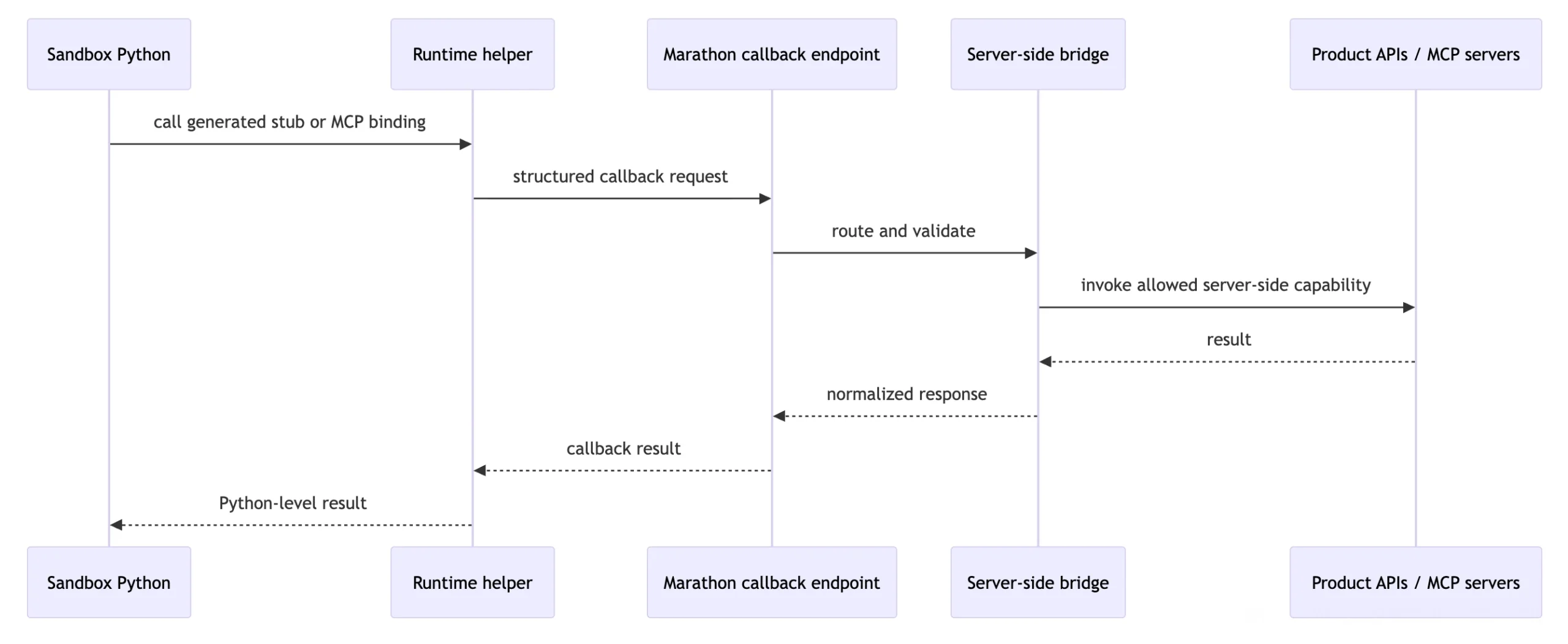
This bridge acts as a secure translator. When code running inside the sandbox executes a tool call, the bridge routes the request back through the control plane to fetch data from external MCP (Model Context Protocol) servers, preventing the isolated sandbox environment from needing direct external network access.
Agent Coordination
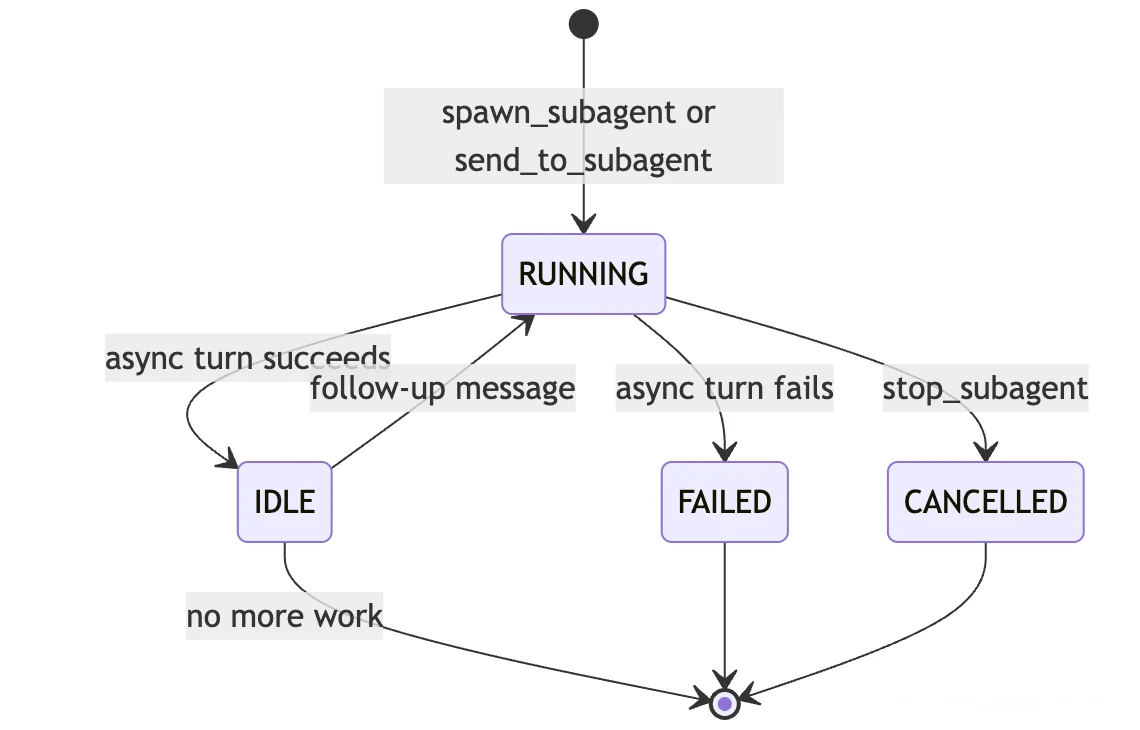
A core requirement was to support a true multi-agent system. Previously, we spawned single-use sub-agents that ran synchronously, with no way to detach them or persist their states. Consequently, if a sub-agent’s work required follow-up actions, the parent agent had to initialize an entirely new instance and re-hydrate it with all the relevant context. This architecture also made it difficult for the system to handle parallel, distinct workflows without forcing the primary agent to maintain deep context for both tasks simultaneously.
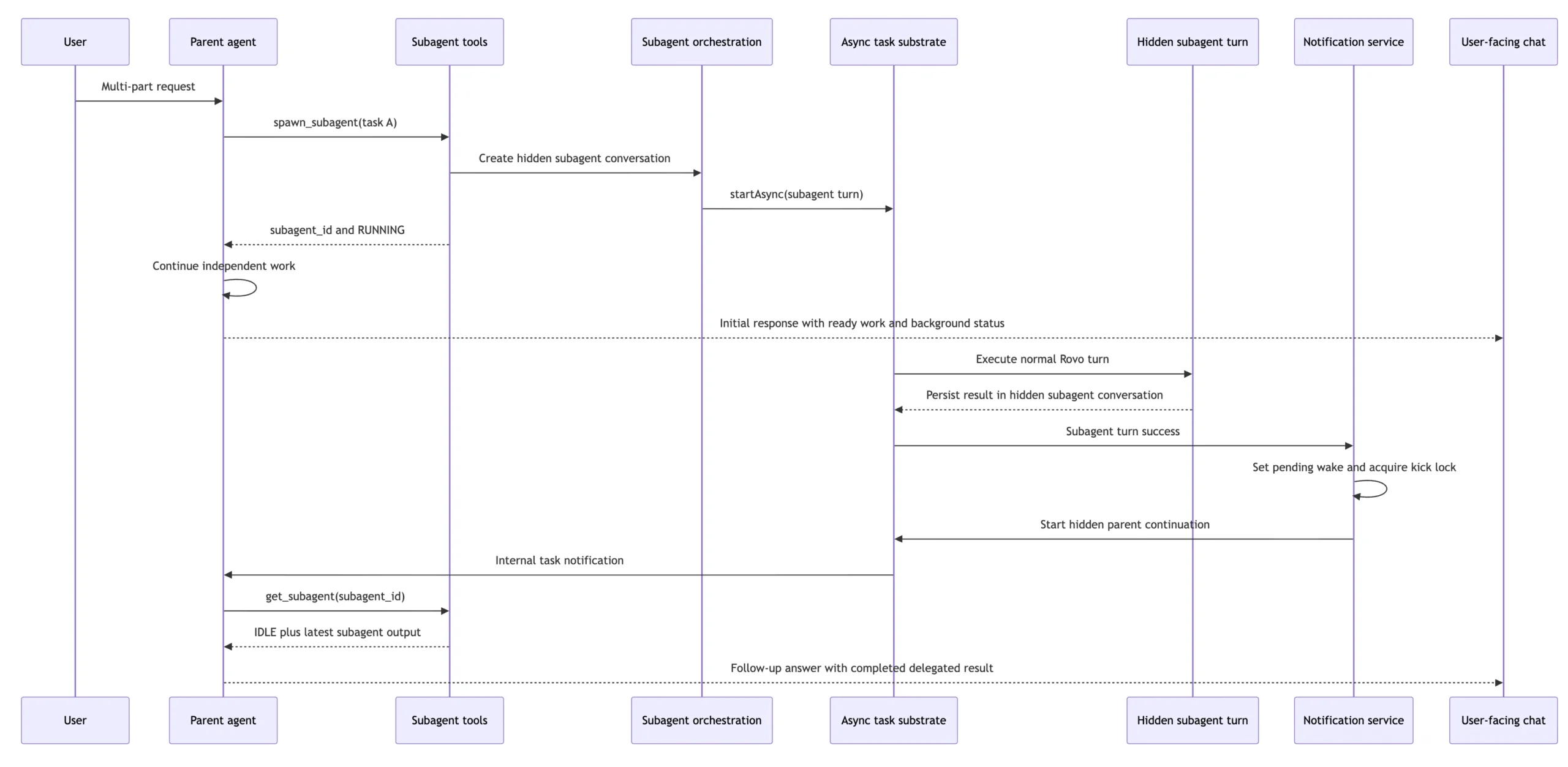
To solve this, interactive sub-agents allow a parent agent to delegate independent work to background processes without blocking its own execution loop. A sub-agent can outlive the parent’s immediate response turn, maintain its own independent conversation history, and be polled for status updates or receive follow-up instructions. Crucially, it can also wake the parent agent upon task completion.
Architecturally, a sub-agent is not treated as a lightweight, ephemeral function call. Instead, it is instantiated as a hidden Rovo Chat conversation backed by a durable handle, asynchronous task execution, optional shared sandbox access, and a dedicated notification loop back to the parent context.
Error Recovery
In an agent harness, the happy path is fairly straightforward. We start the sandbox, call the model, it returns a tool call for some code or api we want to execute, we run the code, and the user goes on their day.
However, a big part of unleashing the raw power of the LLM is that it will try to do things that we don’t anticipate. We have found that intelligent and successful error recovery is a large portion of what makes an agent effective. With the right error recovery scaffolding, we enable agents to overcome problems that otherwise would be terminal error states.
Discovery Probes: When writing code, like any software system, LLMs can encounter unexpected edge cases – referencing an incorrect function signature or passing an unexpected param. To prevent the agent from wasting tokens in a blind retry loop, our harness intercepts these runtime errors and returns rich, structured execution feedback.
To effectively recover, we have to guide the agent effectively by returning guidance back to the LLM that can help it figure out what it actually wanted to call.

In these scenarios, we enrich the error payload so the agent instantly understands the valid function signature, available parameters, and context required to successfully self-correct and retry.
Checkpointing: If a multi-step automation fails on step 10 out of 11, a naive retry would re-run the entire script from scratch, potentially creating duplicate artifacts or triggering “Entity Already Exists” errors. By snapshotting the execution state at key milestones, we enable precise rollbacks, preventing redundant side effects. By taking snapshots of the execution history and preserving previous execution states, we enable efficient rollbacks and retries, preventing the agent from needing to re-execute redundant steps.
Systematic Self-Evolution via Integrated Evals
An agent harness quickly becomes stale, data shapes change, user behavior shifts making agent evolution a requirement of a good harness. Relying on manual debugging and ad-hoc prompt tweaks is a recipe for slow iteration and rapid technical debt. Instead, the true value of an agent harness lies in its capacity for automated, continuous growth. The agent harness is deeply integrated into our automated evaluation pipeline, closing the loop between execution and optimization.
Instead of relying on manual tweaks to handle edge cases, this integration unlocks systematic human-guided improvement. When the agent encounters a failed query or an inefficient execution path, the telemetry is flagged, analyzed, and automatically fed back into our evaluation suite – with engineers reviewing and approving optimizations before they’re applied. This continuous feedback loop ensures Rovo chat keeps getting better over time.
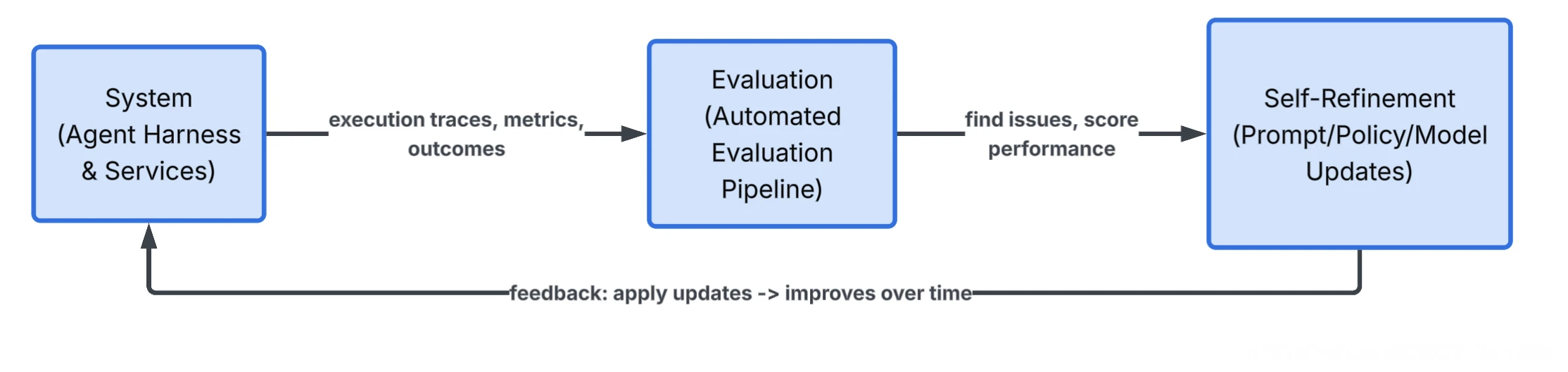
While the current self evolution flow still requires human input, building out this flywheel becomes crucially important to ensure that we are building for the future. As agents grow more capable, software engineers will increasingly focus on higher order work like defining goals, setting guardrails, guiding the agent evolution, while spending less time on repetitive deterministic logic.
Where next?
We live in an exciting time where we’ve quickly moved from using models to handle RAG to now creating a space for an always on agent to live with each user. It can remember the user’s actions, keep track of conversations that it’s had, evolving from simple retrieval-augmented generation (RAG) tools into intelligent, context-aware assistants. They will function as creative sparring partners and background operators, monitoring streams, triaging notifications, and autonomously executing complex workflows while keeping the user seamlessly updated. To ensure the agent grows with the user, we need to make sure that the agent can evolve and refine as needed.