


I built a ~300-line Python bridge so I can chat with Rovo Dev directly from Slack – no terminal, no context switching, just AI-assisted coding wherever I already am.

🤖 This is a blog post documenting my experiment connecting Rovo Dev CLI to Slack – so I can code with AI without ever touching the terminal.
The Setup: From Terminal to Slack
I spend a lot of time in Slack. My terminal? Less so. So I asked myself – what if I could talk to Rovo Dev (Atlassian’s AI coding agent) directly from Slack? No switching context, no opening a terminal, no acli rovodev run --yolo every time.
Turns out – it’s totally doable. Here’s how I built it over a weekend.
The Big Picture
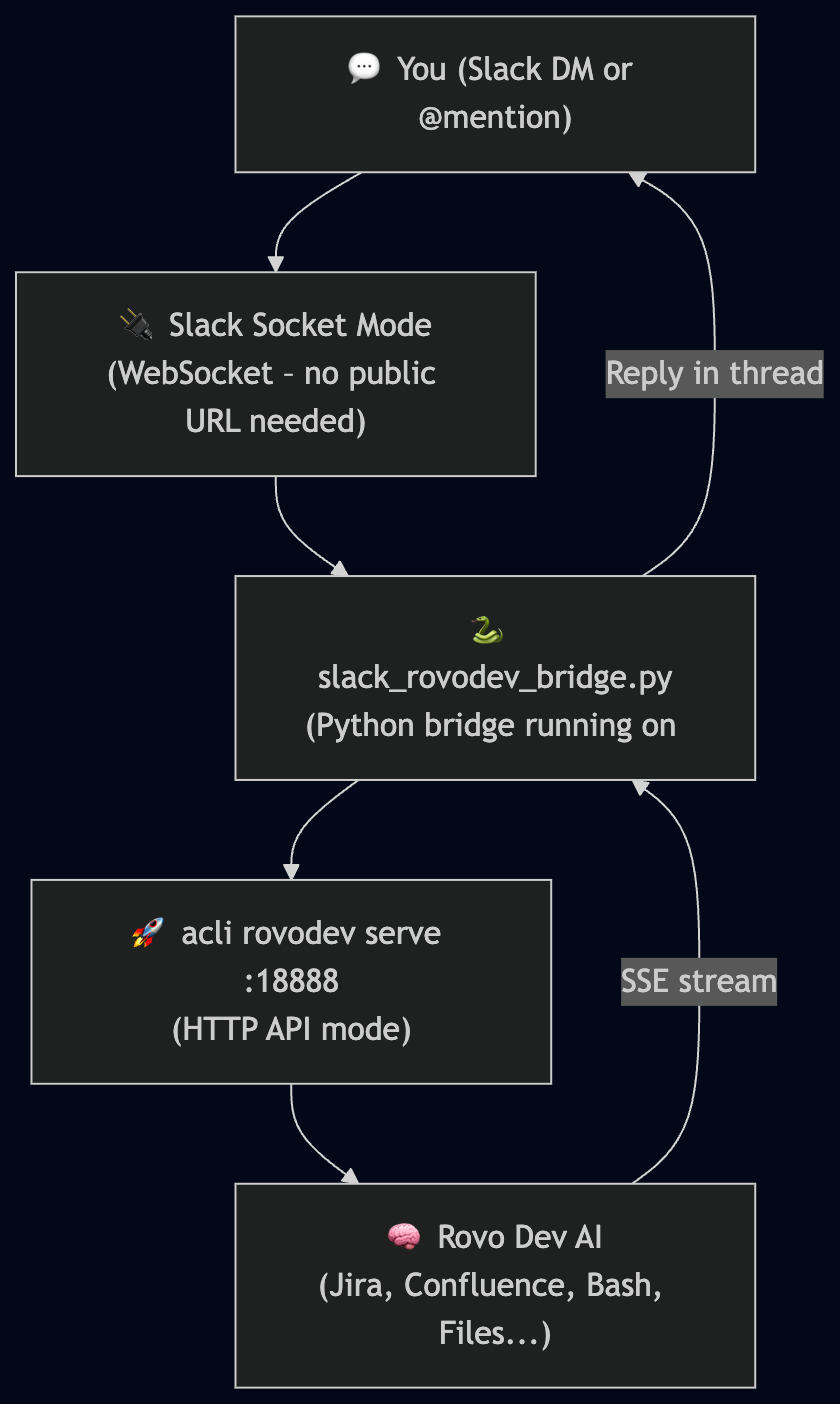
Why This is Cool
- ✅ No terminal needed – chat with your AI coding agent from Slack
- ✅ Socket Mode – no public URL, no ngrok, no firewall rules
- ✅ Private – only my messages are processed, everyone else is silently ignored
- ✅ Auto-starts on boot – runs as a systemd service, always available
- ✅ Full Rovo Dev power – it can read files, run bash, query Jira, search Confluence
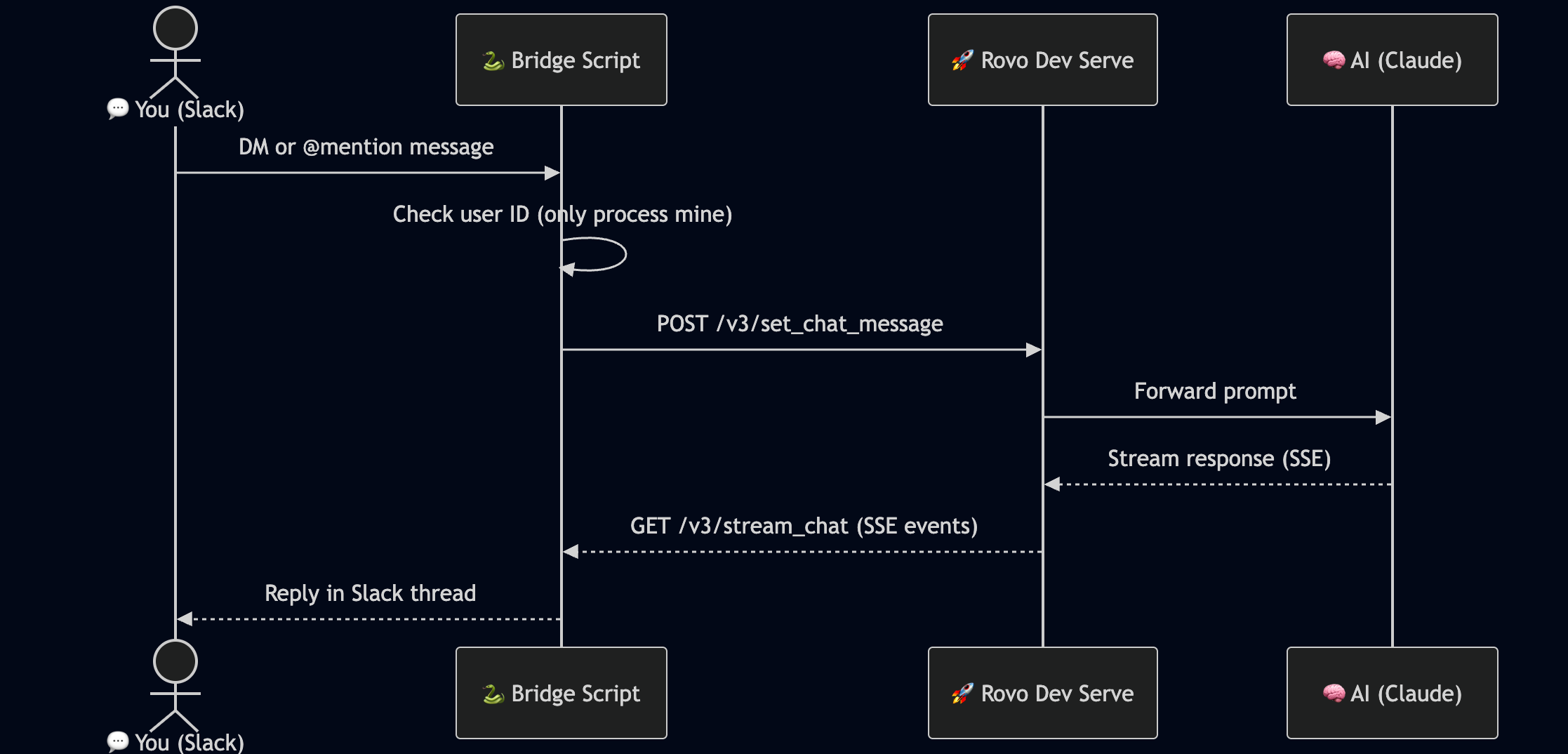
How It Works – Step by Step
The Stack
| Component | Technology | Purpose |
|---|---|---|
| AI Agent | acli rovodev serve | HTTP API mode of Rovo Dev CLI |
| Slack Integration | Slack Bolt (Python) + Socket Mode | Receive & send Slack messages |
| Bridge | Python 3 (~300 lines) | Glues Slack ↔ Rovo Dev together |
| Process Manager | systemd | Auto-start on boot, auto-restart on crash |
Key Discovery: acli rovodev serve
The magic ingredient is acli rovodev serve PORT – a little-known mode of the Rovo Dev CLI that spins up a local HTTP server with a clean API:
acli rovodev serve 18888 --disable-session-tokenThis exposes two key endpoints:
POST /v3/set_chat_message– send a message to the AIGET /v3/stream_chat– receive the response as a Server-Sent Events (SSE) stream
The bridge POSTs your Slack message, then reads the SSE stream and collects the full response before posting it back to Slack.
Security: Only My Messages
Anyone can DM the bot or @mention it – but only messages from my Slack user ID are processed. Everyone else gets silently ignored. One line of code:
ALLOWED_USER_ID = os.environ.get("ALLOWED_USER_ID", "")
def is_allowed(event) -> bool:
    if not ALLOWED_USER_ID:
        return True  # no restriction set
    return event.get("user") == ALLOWED_USER_ID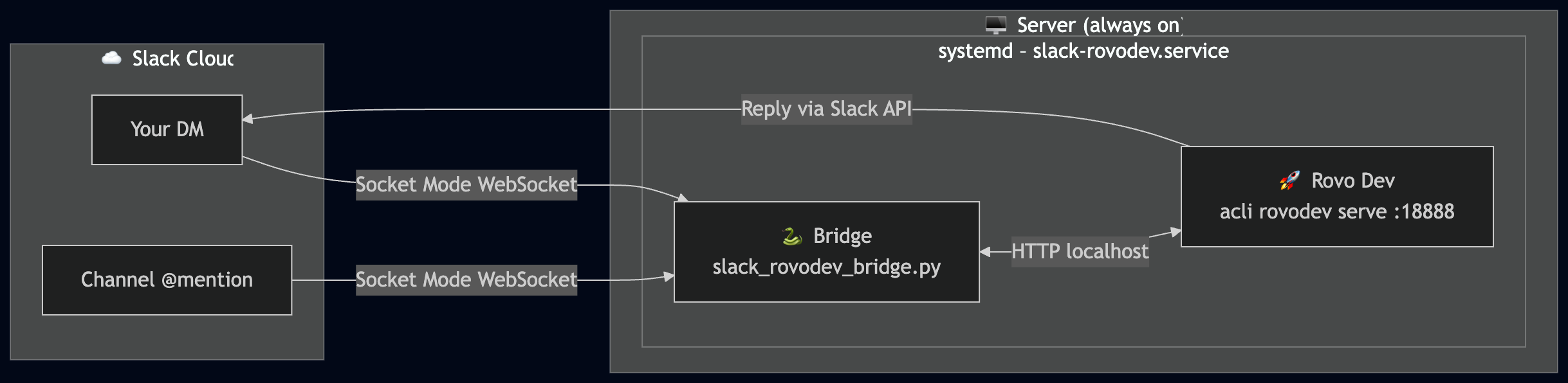

💬 “what’s in my home directory?” → Rovo Dev runs ls -la ~ and replies
💬 “explain the AGENTS.md file in my workspace” → reads and summarizes it
💬 “show me my unresolved Jira issues” → queries Jira and lists them
💬 “create a new branch called feature/xyz” → runs git commands
💬 “write unit tests for this function [paste code]” → generates tests
What’s Next
- 🔜 Streaming replies – post partial responses as Rovo Dev types (like ChatGPT)
- 🔜 Multi-session support – different Slack threads = different Rovo Dev sessions
- 🔜 Slash commands –
/rv plan,/rv ask,/rv review - 🔜 File uploads – attach a file in Slack, Rovo Dev reads it
TL;DR

I built a Slack bot that bridges to acli rovodev serve via HTTP + SSE. It runs as a systemd service, auto-starts on boot, and only responds to my messages. Now I can do AI-assisted coding entirely from Slack – no terminal required.
Total code: ~300 lines of Python. Setup time: ~2 hours (mostly fighting Slack scopes 😅).


